We recently developed a new computational chemistry practical laboratory here at Imperial College. I gave a talk about it at the recent ACS meeting in Salt Lake City. If you want to see the details of the lab, do go here. The talk itself contains further links and examples. Perhaps here I can quote only the final remark, namely that computational chemistry can now provide chemical accuracy for many problems, including spectroscopy and mechanism, and that the basic tools for doing it can easily be carried around in a backpack! Or, perhaps in the not to distant future, an iPhone!
Tag: Chemical IT
-
On the importance of Digital repositories in Chemistry
The preceeding blog entries contain stories about chemical behaviour. If you have clicked on the diagrams, you may even have gotten a Jmol view of the relevant molecules popping up. But if you are truly curious, you may even have the urge to acquire the relevant 3D information about the molecule, and play with it yourself. Even after 15 years of the (chemical) Web, this can be distressingly difficult to achieve (or can it be that it is only myself who wishes to view molecules in their native mode?). Thus the standard mechanism is to seek out on journal pages that disarming little entry entitled supporting information and to hope that you might find something useful embedded there. Embedded is the correct description, since the information is often found within the confines of an Acrobat file, and has to be extracted from there. Indeed, that is what I had to resort to in order to write one of the blog entries below. I ground my teeth whilst doing so.
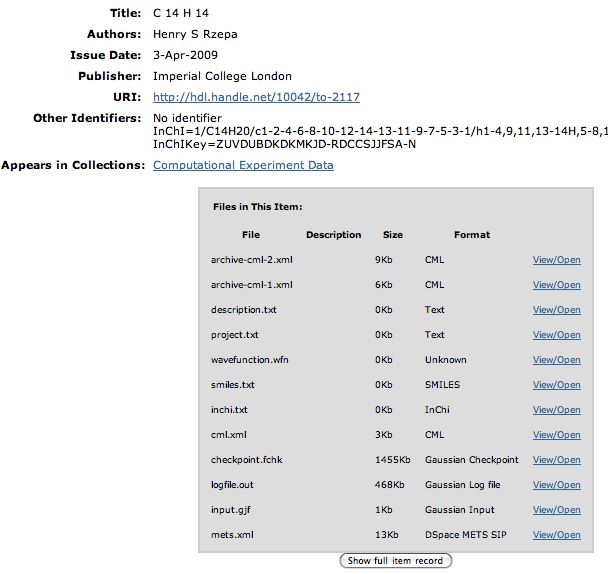
So is there a better way? We think so! The digital repository. If you click on this you should see the entry directly. What can you do there? Well, if you have suitable programs, you can download eg a Checkpoint file of the calculation that created the molecule model and re-activate it there. Or you can download just the CML file for viewing in any CML-compliant program (such as e.g. Jmol). Or you can check up on the InCHi string or the InChI Key of the molecule.What about the specific entry above? Well, it corresponds to the calculation for the π4 + π2 cycloaddition described in the blog entry below. You can now verify for yourself the assertions made in that entry, ie that the rotation mode is disrotatory, or that the bond is forming antarafacially. You do not need to take my word for it! If the Digital repository is too much trouble for you, click on the graphic instead to get a similar result.
We now regularly put such links into journal articles, in the form of Web-enhanced tables and figures, so that it is literally just one click away from such an article to having a vibrant molecule dancing in front of you. All (chemistry) journals should do this. If they do not yet, then contact their editor in chief when you next submit an article and ask them why not!
See also the blog by Peter Murray-Rust.
-
Jmol and WordPress: Loading 3D molecular models, molecular isosurfaces and molecular vibrations into a blog

Click on the static image to get an active model. The code used to obtain the above was:
-
<script src="../Jmol/Jmol.js" type="text/javascript" />
-
This line is best added to the theme header by editing the file /wp-content/themes/default/header.php to add the following line in the header:
<script src="../Jmol/Jmol.js" type="text/javascript"></script> -
<img onclick=”jmolInitialize(‘../Jmol/’,’JmolAppletSigned.jar’);jmolSetAppletColor(‘yellow’);
jmolApplet([450,450],’load wp-content/uploads/2009/08/HV2-62.jvxl;isosurface translucent;zoom 5;moveto 4 0 2 0 90 70;’);” alt=”A lemniscular molecular orbital” src=”http://www.ch.imperial.ac.uk/rzepa/blog/wp-content/uploads/2008/04/14-knot.jpg” />where of course the uploads directory needs to be modified to correspond to your own content, and the file and script following it also correspond to the effect you wish to achieve.
The path wp-content/uploads/2009/08/ is that created by the built-in editor using the Add media file upload mechanism. The Jmol directory is located at the level above that of the blog itself. The JVXL file is created from either the corresponding (Gaussian) output file, or a CUB file created using a program such as Gaussview. Any suitable surface can be displayed using JVXL. In addition to MOs, we have also displayed ELF (Electron localization function) isosurfaces and molecular vibrations. For the latter, use a script of the form
'load wp-content/uploads/2008/04/vibration.log; frame 9; vectors on;vectors 4;vectors scale 5.0; color vectors green; vibration 10;animation mode loop;'where the vibration you want is contained in e.g. frame 9.
There does appear to be a display bug with the above; the Jmol model replaces the window rather than being inlined in it. Once the model is displayed, just refresh the page to return to the blog entry.
A recent addition is the display of non-covalent-interaction (NCI) surfaces, which are colour coded by using the values in one cube of points to colorize a second cube.
'load wp-content/uploads/2011/05/isobornyl1.xyz;isosurface wp-content/uploads/2011/05/isobornyl1.jvxl colorscheme translucent bgyor;'
-